🕶️ VRChat Companion Utility v1.2
Built for when VR decides to fight you back.
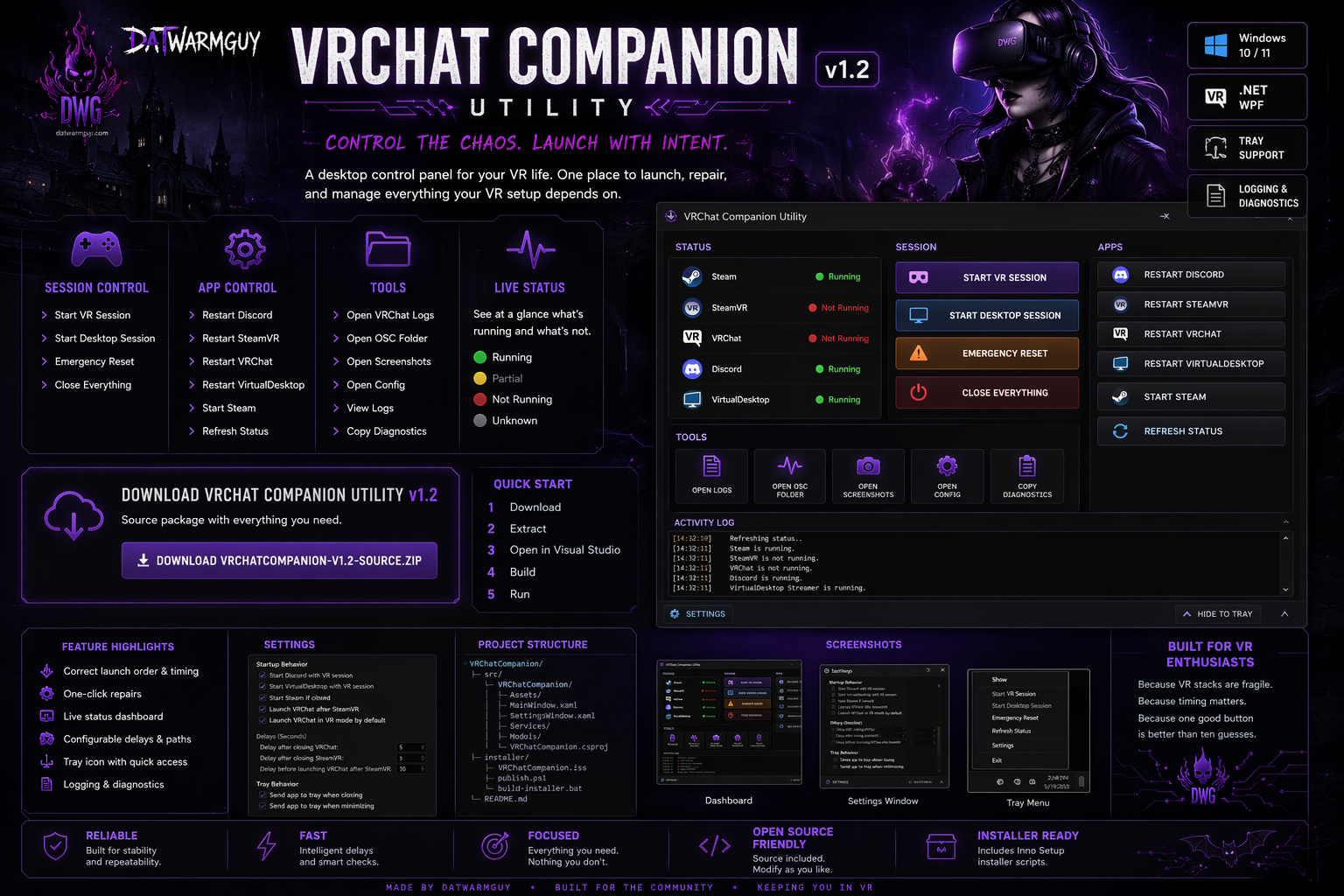
⚡ Overview
You know the drill.
SteamVR half-starts.
VRChat launches wrong.
VirtualDesktop is fine… until it isn’t.
Discord? Somehow involved.
This tool exists for one reason:
Stop fixing things manually.
One panel. One click. Back in VR.
🎛️ What You Get
🎮 Session Control
- Start VR Session
- Start Desktop Session
- Emergency Reset (the “burn it down and try again” button)
- Close Everything
🔧 App Control
- Restart Discord
- Restart SteamVR
- Restart VRChat
- Restart VirtualDesktop
- Start Steam
- Refresh Status
🧰 Tools
- Open VRChat Logs
- Open OSC Folder
- Open Screenshots
- Open Config
- View Logs
- Copy Diagnostics
🧬 Live Status
No guessing. No “I think it’s running?”
🟢 Running 🔴 Not Running 🟡 Partial ⚪ Unknown[ STATUS ]
Steam 🟢
SteamVR 🔴
VRChat 🔴
Discord 🟢
VirtualDesktop 🟢🖥️ The Dashboard
Clean. Focused. No clutter.
[ SESSION ]
Start VR Session
Start Desktop
Emergency Reset
Close Everything

[ APPS ]
Restart Discord / SteamVR / VRChat / VirtualDesktop

[ TOOLS ]
Logs / OSC / Screenshots / Config

[ ACTIVITY ]
Live feedback so you know what’s happening
📦 Download
[⬇️ Download VRChat Companion Utility v1.2](./downloads/VRChatCompanion-v1.2-source.zip)🚀 Quick Start
1. Download
2. Extract
3. Open in Visual Studio
4. Build
5. Run
Or use the included installer scripts to package it cleanly.
⚙️ Settings
Customize how your VR session behaves.
Startup
- Auto-start Discord
- Auto-start VirtualDesktop
- Auto-start Steam
- Auto-launch VRChat
Timing
- Control delays between shutdown/startup
- Tune for your machine
Paths
- Override install locations if needed
Tray Behavior
- Minimize to tray
- Close to tray
🧾 Logging
Everything gets tracked.
%AppData%\VRChatCompanion\logs\app.logUse it to:
- debug issues
- track behavior
- figure out what broke
🧪 When Things Break
SteamVR won’t start? → Check Steam is running
VRChat launches wrong? → Use Start VR Session
Discord missing? → Set path in settings
VirtualDesktop not found? → Set Streamer path manually
🧠 Why This Exists
Because VR setups are fragile.
Because timing matters.
Because:
“Just restart everything” isn’t a strategy.
🧩 Future Upgrades
- Tray quick actions
- Crash recovery
- Profiles
- Creator Companion shortcuts
- OSC awareness
- Full installer release
🖤 Final Note
This isn’t flashy.
It’s reliable.
Click once. Fix everything. Get back in.
⚡ Minimal Version (For Homepage Cards)
VRChat Companion Utility v1.2
A desktop tool to launch and fix VRChat sessions.
- Start VR Session
- Emergency Reset
- Restart Discord / SteamVR / VRChat / VirtualDesktop
- Live status dashboard
- Tray support
🔥 Optional: Add This to Your Site (CSS Flavor)
If your site allows custom CSS, this will give it that dark neon edge:
code, pre {
  background: #0b0b0f;
  color: #d4d4ff;
  border: 1px solid #2a2a40;
}

h1, h2, h3 {
  color: #c084fc;
}

a {
  color: #7dd3fc;
}

a:hover {
  color: #a78bfa;
}
🎨 Want More?
I can also:
- create a custom banner image (gothic/cyber style)
- design a logo for the utility
- match this page exactly to your datwarmguy.com layout
- or generate mock screenshots of the app UI for the page
Just tell me 👍